Ask a DBA who gets SQL Server email and you will hear the operator list, recited with confidence. It is rarely the whole list. Across the servers we review, the addresses that matter most were passed straight to a mail procedure by a script years ago, and nobody has looked at them since.
Who gets SQL Server email, and how can I list every address? Who gets SQL Server email is answered by msdb, in the recipients, copy_recipients and blind_copy_recipients columns of sysmail_allitems. Splitting those semicolon separated lists into single addresses gives the real list, including every address a script passed to sp_send_dbmail that no operator dialog shows, over whatever window you choose.
Database Health Monitor answers the question from the only place it is recorded. Its Mail Recipients report takes the recipient columns of every message in msdb and turns them into one row per address. Most teams have never seen that list on a single screen. The first look is usually uncomfortable.
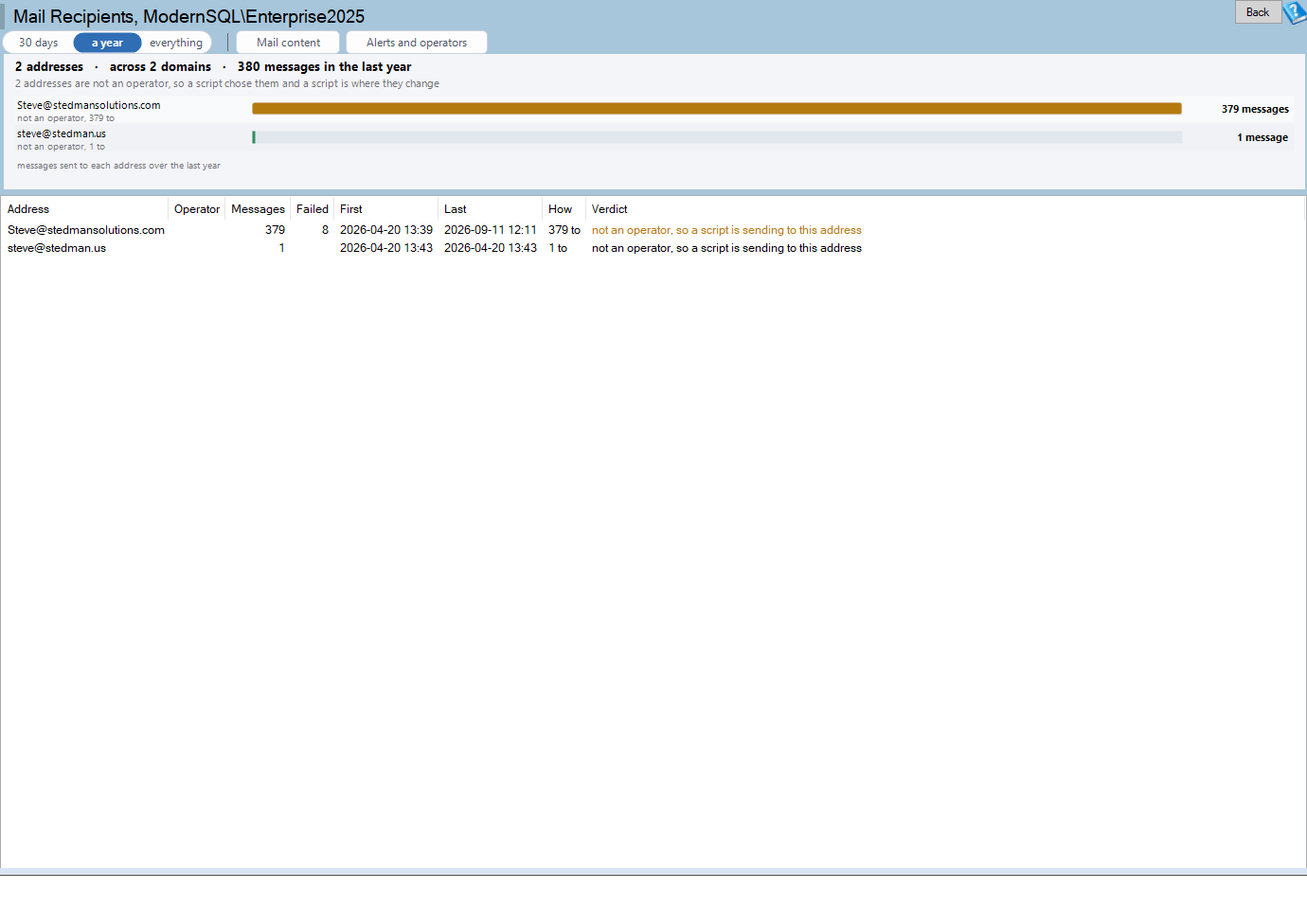
Mail Recipients is one of the reports in Database Health Monitor. It runs against your own servers, and it takes about a minute to have this same screen open on one of them.
Why the operator list never shows who gets SQL Server email
Operators are the obvious place to look. Each has one address, each appears in SSMS, and alerts notify them. But a typical instance sends most of its mail some other way. A script calls sp_send_dbmail with a literal address, and that address lives in no dialog anywhere. Nobody maintains it. Nobody reviews it.
The only trace is the recipients column of every message sent. That column holds semicolon separated lists in a varchar(max), which is why the report splits them in the application rather than in the query.
What does this cost? Nothing, right up until the day it does. A failure mail with nowhere to go is not an error anyone sees. An alert can fire perfectly and land in a mailbox that no longer exists, and the incident starts late.
Three findings hiding in the list
Once the addresses are a list, three patterns show up. We meet each of them regularly.
- The leaver. Somebody who left two years ago is still getting the nightly failure mail. Nobody finds out until the mail server starts rejecting it.
- The operator who receives nothing. An address that has never appeared on a sent message means no alert is wired to it, or its alerts have never fired. Better to learn which before an incident than during one.
- The address that is not an operator. Anything Agent does not know about is somebody a script decided to mail. The fix belongs in that script, not in an operator dialog.
The first two are cleanup. The third is a design question, and it is the one that surprises people.
Reading the report without getting lost
The chart is one bar per address, ranked by messages sent, with a line under each name saying what the page knows about it. Whether an operator owns the address is the line to read first. Click a bar to select it in the grid. Double click opens Mail Content, which groups what is being sent, so you can see which message shapes a script is producing.
The grid carries the rest. Look at Failed beside Messages. An address with a hundred messages and a hundred failures is a mailbox that is gone, and every alert using it has effectively been off for as long as that has been true. Verdict sorts each row into one of three states.
| Verdict | What it means | Where to go next |
|---|---|---|
| Operator with traffic | An operator owns it and mail is flowing. | Confirm the address still belongs to a live person. |
| Operator with none | No alert notifies it, or none that does has ever fired. | Alerts and Operators separates the two. |
| Address no operator owns | A script chose it. | Mail Content, then the script that composes the message. |
The window defaults to a year, with 30 days and everything as the alternatives. Everything reads every row of sysmail_allitems, which on an instance that has never trimmed its history can be millions, so start with the year. The full reference lives on the Mail Recipients documentation page.
If the page says Nobody has been sent anything from this instance, take it literally. No mail in the window and no operator with an address means an alert that fires has nowhere to go.
The nightly failure mail usually comes from jobs, and when those jobs run is its own guess worth measuring. We covered that in Your SQL Server Maintenance Window Is a Guess. Measure It.
What to check on your own server
- Run a query over dbo.sysmail_allitems and split its three recipient columns on semicolons to get one row per address
- Compare that address list with the email addresses in dbo.sysoperators to find the addresses no operator owns
- Check dbo.sysmail_faileditems for any address whose messages all failed, since that mailbox is probably gone
- Note each operator with zero messages, then check whether an alert notifies it or its alerts have simply never fired
- Find the script behind each address no operator owns, because that script is where the address has to change
Try Database Health Monitor Today
Mail Recipients turns every address ever mailed into one list, so the leaver, the dead mailbox and the script-chosen recipient all show. Database Health Monitor shows it on every instance you connect, in the time it takes to open the report.
Download Database Health Monitor and run the Mail Recipients report against your own server. There is nothing to configure first, and you will know inside a few minutes whether it tells you something you did not already know.