
Corrupt SQL Server database? We treat it as an emergency.
Free 30-minute consult with a corruption-repair specialist. We drop everything until your database is back online.
US-based SQL Server specialists since 2015 – no cost, no obligation
Before you do anything else
Do this now
- Take a full backup of the corrupt database exactly as it is, and back up the transaction log.
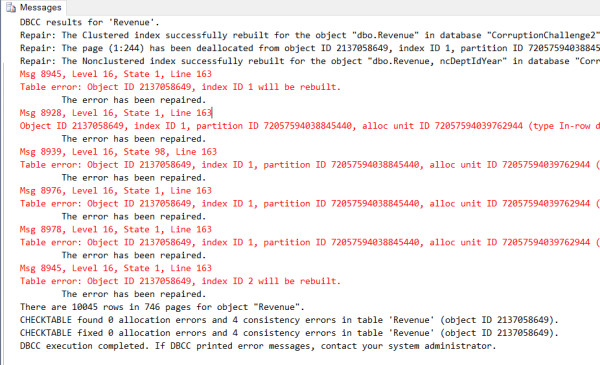
- Save the complete DBCC CHECKDB output to a file.
- Write down the exact error numbers and messages (for example 823, 824, 825, 8939).
- Note when the last known-good backup was taken.
Do not do this
- Do not run DBCC CHECKDB with REPAIR_ALLOW_DATA_LOSS.
- Do not detach and re-attach the database.
- Do not keep restarting SQL Server or rebooting the host.
- Do not restore over your only copy.
Then book a free consult or call (360) 610-7833 and we will take it from there.
Sorry you are dealing with corruption. Here is exactly what happens next.
We are US-based SQL Server specialists who have repaired corrupt databases since 2015. Our expert team assesses the damage with DBCC CHECKDB, repairs it with minimal or no data loss, and hardens your server so it does not happen again. The first step is a free 30-minute consult.
How we repair corrupt SQL Server databases
1
Assess
- Run DBCC CHECKDB and read the full output.
- Identify the affected pages, indexes and tables.
- Find the root cause: I/O subsystem, hardware or SQL Server.
2
Repair
- Restore individual pages from backups where possible.
- Rebuild damaged nonclustered indexes.
- Extract and rebuild data when no clean backup exists, aiming for zero data loss.
3
Harden
- Backups you have actually test-restored.
- PAGE_VERIFY CHECKSUM and scheduled CHECKDB.
- Monitoring and alerts with Database Health Monitor.
Read more about our corruption repair services.
Not sure what the CHECKDB output means? Send it to us and we will tell you what you are looking at.
What to expect when you call
Do not wait. The longer corruption persists, the greater the risk to your data and business operations.
Response
Corruption is handled as an emergency. We drop everything and start on the free consult call.
Timeline
Most databases are back online within 24 to 48 hours.
Cost
The 30-minute consult is free, and you get a fixed quote before any repair work starts.
Have this ready for the call
- SQL Server version and edition.
- The full DBCC CHECKDB output.
- The exact error messages.
- The date of the last known-good backup.
- The database size.
- Whether this is a production system.
Prefer to talk first? Contact us or call Steve at (360) 610-7833.
Since 2015
Repairing corrupt SQL Server databases
US-based
Team of SQL Server specialists
Top 1%
in their market, as one client put it
24-48 hours
Typical time to get a database back online
What clients say after a corruption repair
“Steve and his team quickly assessed our MS SQL corruption situation, advised on the best course of action and expertly effected fixes with no data loss or downtime.”
— Alex Victoratos | I.T Director, PayStream
“Steve and his team began work almost immediately and stayed in constant contact throughout the entire process. … The end result was a 99% recovery of the corruption, and the remaining 1% was irrelevant and not needed.”
— Robert Rohr | E-Hounds Inc., Senior Analyst
“Steve and team went to work immediately and worked virtually non-stop until the problem was resolved. We had no data loss and very little business time down.”
— Dudley Jones
Frequently asked questions
Can you recover the data if I have no usable backup?
Often, yes. When no recent backups are available we use advanced techniques to extract and restore as much data as possible. We have recovered databases where the only backup was out of date, and where the backups themselves were corrupt. The sooner we start, the greater the likelihood of recovering all of your data.
Will I lose data during the repair?
Our focus is on little to no data loss. Where possible we restore individual pages from backups and rebuild damaged indexes rather than discarding anything. The one thing to avoid is REPAIR_ALLOW_DATA_LOSS, which sacrifices data to make the database structurally consistent.
How long does a corruption repair take?
Generally your database will be up and running within 24 to 48 hours. We treat corruption as an emergency and drop everything until it is back up. Delaying the repair can eliminate recovery options if the damage gets worse, so the quicker we start the better.
Do you need remote access to my server, and how is it secured?
We will discuss access on the free 30-minute consult and agree on an approach that fits your security requirements.
Which SQL Server versions do you support?
All of them. We repair any SQL Server version and edition, including Express, Standard and Enterprise. That covers SQL Server 2005 and newer, and in some cases we even service SQL Server 2000.
What does the repair cost?
The 30-minute consult is free. Once we understand your situation we set clear expectations and pricing before the repair starts.
Should I run DBCC CHECKDB with REPAIR_ALLOW_DATA_LOSS?
No, not before talking to us. It is the most aggressive repair option: it removes corrupted pages or objects to restore structural integrity, so data loss is not only possible but likely. Some repair suggestions found on the internet can cost you data. Back up the database as it is, save the CHECKDB output, and read DBCC CHECKDB with REPAIR_ALLOW_DATA_LOSS for the details.
Can I keep using the database while it is corrupt?
Corruption does not get better on its own, and ignoring it will not help. Do not restart the instance: a restart can leave the database stuck in Recovery Pending or marked Suspect, which stops anyone using it. Take a backup of the database as it is and call us, because delaying the repair can eliminate recovery options.
Watch: what to do when CHECKDB finds corruption
Steve Stedman and Derrick Bovenkamp talk through what causes SQL Server corruption, usually I/O problems such as iSCSI firmware or antivirus misconfiguration, the symptoms to watch for, why daily CHECKDB and tested backups matter, and when to call for help (57 minutes).

Ready to get your database back?
Free consult first. Fixed quote before any work begins.
More corruption resources
Corrupt SQL Server Repair Service
The full service page: 24 to 48 hour turnaround, the common error messages we see, an FAQ and client stories.
Monitor for corruption with Database Health Monitor
Over 100 built-in reports, including suspect pages and backup checks, so corruption is caught before it spreads.
When to call in the experts
Why asking for help early leaves you more recovery options, and what the free 30-minute consult covers.
Running DBCC CHECKDB daily
Why we recommend checking every database every day, so corruption is found while it is still cheap to fix.
How to check database corruption in SQL Server
How to run the checks, read the results, and what to do if corruption is detected.
SQL Server detected a logical consistency-based I/O error
What this error means, what usually causes it, and how we resolve it.
Recent posts on corruption: SQL Server Database Integrity: Importance and Corruption Prevention Tips, SQL Server Corruption Class: Learn to Prepare and Respond Effectively, Corruption Stories with Steve and Derrick.