
Disk space exhaustion is one of the most preventable SQL Server emergencies in existence. Unlike hardware failures or unexpected query plan changes, disk space issues develop on a predictable trajectory. Databases grow. Log files accumulate. The available space decreases at a rate that is measurable, trackable, and extrapolatable into the future. There is no reason for a DBA to be paged at 2 AM because a SQL Server drive filled up, because the data needed to prevent that page was available weeks in advance.
And yet disk space emergencies happen routinely. They happen because most monitoring approaches watch current disk space rather than tracking disk space trends over time. A threshold alert that fires when a drive reaches 90 percent full provides hours of lead time on a fast-growing drive. An alert that fires when a drive is projected to reach 90 percent in the next fourteen days provides weeks of lead time. The difference between those two approaches is the difference between a planned maintenance activity and a 2 AM emergency.
Disk space forecasting in Database Health Monitor tracks growth trends over time and generates projections that provide the lead time needed for planned, unhurried responses to capacity concerns that would otherwise become crises.
Why Threshold Alerts Alone Are Not Enough for Disk Space Forecasting
A simple threshold alert, configured to fire when a disk reaches a certain percentage utilized, is better than no monitoring. It will catch the disk that is approaching full and give you some time to respond. But it has a fundamental limitation: it tells you where you are, not where you are going.
Consider two drives, both currently at 70 percent utilized. Drive A has been at approximately 70 percent for the past six months, growing slowly as database backups accumulate. Drive B was at 30 percent six weeks ago and has been growing rapidly as a new data ingestion process loads several gigabytes per day. Both drives trigger the same threshold alert at the same utilization level, but their situations are completely different. Drive A may be fine for another year. Drive B may be full within two weeks.
A threshold alert cannot distinguish between these scenarios. A forecasting system that tracks the growth rate and projects it forward can tell you immediately that Drive A is not a concern and Drive B needs immediate attention, even though both are at identical current utilization levels.
How Growth Trend Tracking Works
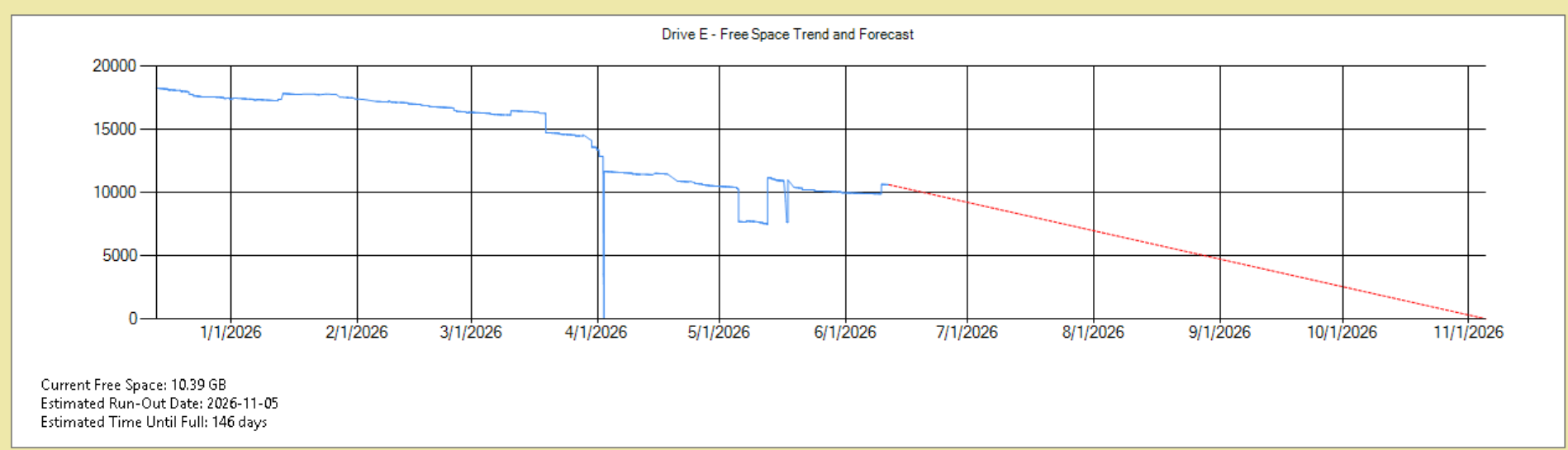
Database Health Monitor collects disk space metrics at regular intervals, building a time series of utilization data for each drive hosting SQL Server files. This time series is the foundation for growth trend analysis.
From the time series, the system calculates the growth rate for each drive over recent time windows. The growth rate calculation uses recent data to be sensitive to current trends while using enough history to smooth out day-to-day variation that does not reflect sustained growth. A database that grows consistently by two gigabytes per day will show a clear trend. A drive that occasionally has large spikes due to log file growth during high-activity periods but is otherwise stable will show a different pattern.
The growth rate is then projected forward to calculate estimated time to reach defined capacity thresholds. These projections are presented alongside current utilization so that you can see both where you are and where you are likely to be at various points in the future based on recent growth patterns.
What the Forecasts Tell You
The forecast output for each monitored drive includes current utilization, recent growth rate, and estimated time to reach configured thresholds. A typical output might indicate:
- Current utilization
- Growth rate
- Estimated time to threshold
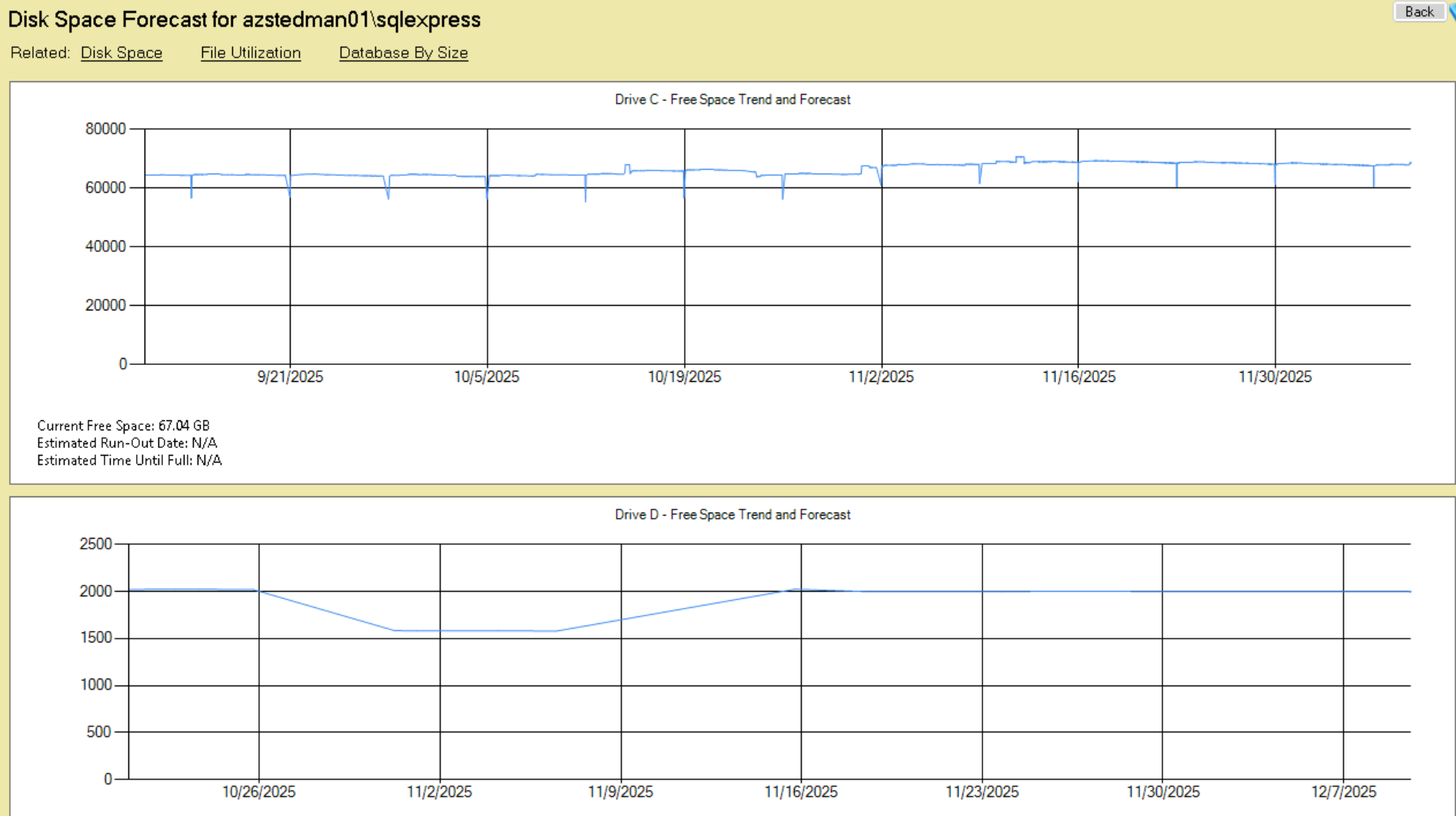
With this information, the appropriate response is not an emergency. It is a calendar item to review options within the next week or two, with several weeks of runway to implement a solution. Options might include archiving or purging data that is no longer needed, implementing data compression to reduce space consumption, adjusting backup retention policies, expanding storage capacity, or moving some databases to a different drive with more available space.
All of these options require time to plan and implement. The forecasting information provides that time.
Database-Level Growth Tracking
In addition to drive-level monitoring, Database Health Monitor tracks growth at the individual database level. This provides more granular information about which databases are driving disk space consumption, which is essential for planning targeted responses.
Drive-level monitoring tells you that Drive D is filling up. Database-level growth tracking tells you that Drive D is filling up primarily because the ReportingDB database has grown from 180 GB to 340 GB in the past three months, and that growth is concentrated in the FactSalesData table. That level of specificity points immediately toward the right response: investigate whether all of the data in FactSalesData needs to be retained in the online database, or whether historical data beyond a certain age can be archived or purged.
Without database-level growth visibility, capacity planning conversations are about drives. With database-level visibility, they are about specific data and specific decisions about retention, which are much more actionable.
Log File Growth as a Separate Concern
SQL Server transaction log files grow for different reasons and at different rates than data files, and they deserve separate monitoring attention. Transaction log growth is particularly sensitive to certain operations: large bulk loads, index rebuilds on large tables, long-running transactions that prevent log truncation, and log backup failures that allow the active log to grow without bound.
Database Health Monitor tracks transaction log file sizes separately from data file sizes, enabling monitoring that distinguishes between normal data growth (expected, manageable) and log growth driven by a specific operational condition (potentially problematic, requires investigation).
A transaction log that is growing faster than the data file is a signal worth investigating. Common causes include missing or failed log backup jobs on databases in FULL recovery model, long-running transactions holding open log space that cannot be reused, or an index rebuild or data load operation generating more log than expected. Catching this early, before the log file exhausts the available disk space, prevents a specific class of emergency that is completely avoidable.
Alerting Based on Projections, Not Just Current State
Database Health Monitor’s email alerting can be configured to trigger based on projected capacity rather than only on current utilization. An alert configured to fire when a drive is projected to reach 85 percent utilized within the next 21 days fires at the right time: early enough to provide comfortable lead time, late enough to avoid false alarms for drives that are growing slowly and have years of runway.
This projection-based alerting is qualitatively different from threshold-based alerting in the response it enables. A threshold-based alert at 85 percent requires an immediate response to avoid exceeding 90 percent. A projection-based alert for drives projected to reach 85 percent in 21 days enables a planned response over the following week, with no urgency or time pressure.
Disk Space Forecasting in July
Disk space monitoring and growth forecasting is included in all Database Health Monitor plans from Stedman Solutions. July is Database Health Monitor Month, and annual plans are available at 25 percent off through the end of July.
The 2 AM disk space emergency is a preventable incident. If the monitoring in your current environment watches where you are rather than where you are going, disk space forecasting is a direct investment in prevention.
Check out this offer:Explore our Database Health Monitor special pricing.

Here are all the discounts for Database Health Monitor. Pick the one that fits your server count.
25% off 1 Instance – Code: 25OFF1
25% off 10 Instances – Code: JULY25
25% off 20 Instances – Code: 25OFF20 – Best Value
Free Backup and Restore Course when You Purchase Database Health Monitor
Purchase a new one-year Database Health Monitor subscription during the fourth week of July and receive our SQL Server Backup and Restore Course free of charge. Backups are your last line of defense when disaster strikes, but many organizations don’t discover problems until they need to perform a restore. This course walks through backup strategies, recovery models, restore techniques, and best practices to help ensure your data is protected and recoverable when it matters most. Pairing strong backup practices with the monitoring capabilities of Database Health Monitor gives you greater confidence in the health and resilience of your SQL Server environment. A $39.99 value included free with your purchase.