
The procedure was fixed in 2017, and it is slow again. We see this pattern across shops of every size: the statistics are fresh, the indexes are sound, and the code still behaves as if it were written for a table that no longer exists. A query hint audit SQL Server teams never scheduled is usually the missing step.
How do I run a query hint audit in SQL Server? A query hint audit SQL Server DBAs can trust starts by listing every hint written inside procedures, functions, triggers and views, then pricing each one. Watch for OPTION (RECOMPILE) on busy modules, fixed join orders, copied MAXDOP 1 and blanket NOLOCK. Rank by CPU share, then check Query Store for a better plan.
Database Health Monitor ships a report for exactly this, the Query Hint Census. It reads the text of your modules and tells you which hints are in there, where, and what they cost. The rest of this post is about why that list is worth having.
Why a query hint audit SQL Server shops skip is expensive
Nobody adds a hint out of whim. Someone had a bad plan on a bad Tuesday, tried OPTION (RECOMPILE) or FORCE ORDER, and the pain stopped. The ticket closed. The hint stayed.
Years later the data has moved on. The distribution that justified a LOOP JOIN is gone. MAXDOP 1 got copied into procedures that never needed it. NOLOCK is everywhere, and a TABLOCKX sits in a module that now runs all day. Each one still works. Each one now limits what the optimizer is allowed to do.
In a shop with hundreds of modules, nobody remembers which. That is the cost: not one dramatic failure, but a slow tax paid on every call.
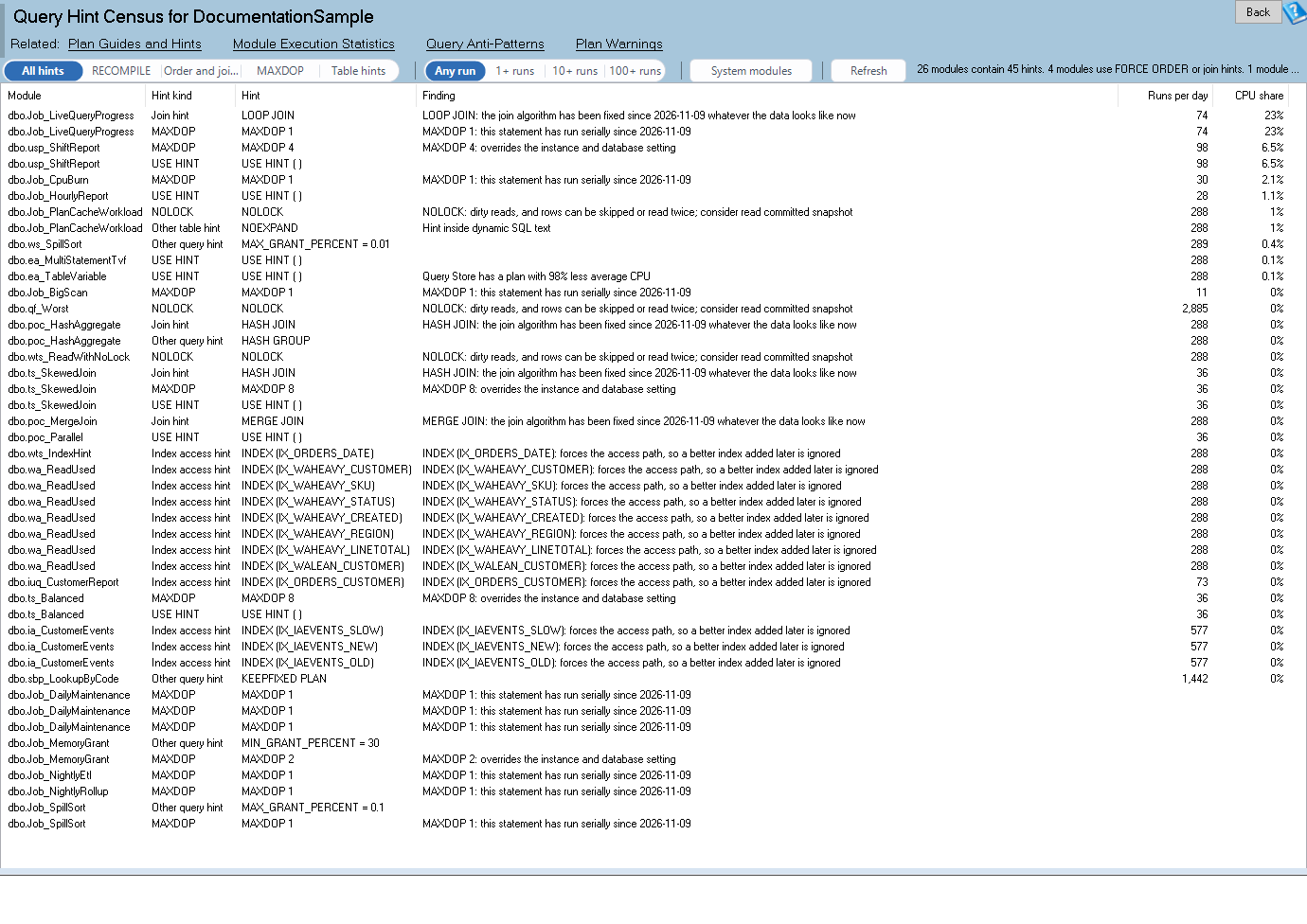
Query Hint Census is one of the reports in Database Health Monitor. It runs against your own servers, and it takes about a minute to have this same screen open on one of them.
The count is the wrong number
The obvious first move is to search the code for the word RECOMPILE and count the hits. That misleads in three ways.
- A hint in a comment or a message string is not a hint, but a plain text search counts it.
- A hint in a procedure that runs twice a month costs almost nothing, while the same hint in a module that runs thousands of times a day is a real bill.
- A count says nothing about whether the plan the hint produces is any good.
What matters is the product of two things: how often the module runs and what the hint costs per call. For RECOMPILE, that cost is compile CPU. The report multiplies runs per day by the compile CPU of the cached plan and gives you an estimated figure in CPU minutes a day. It is an estimate, and it says so, but it is the honest unit.
For ordering, it uses CPU share: how much of all module CPU in the database that module consumes. A module counts as hot at 1,000 runs a day. Start there.
What the report puts on screen
Each row is one hint: the module, the line it sits on, the kind, the hint as written, runs per day, CPU share, estimated cost, plan evidence, and when the module was last modified. That last date matters. It is the youngest the hint can be, so a hint in a module untouched since 2014 is a good candidate for a conversation.

The plan evidence column is the one that turns opinion into argument. If Query Store has at least 100 executions of a different plan for the same query, and that plan averages 30 percent less CPU or better than the one that ran last, the row says a better plan exists. Now you have a reason, not a hunch.
The scan is careful. Comments and string literals are blanked first. Hints in dynamic SQL are marked as such. Several hints inside one OPTION list get a row each, and a WITH that begins a common table expression is not mistaken for a table hint. Encrypted modules cannot be read, so they are skipped and counted.
There are limits worth knowing. Hints in ad hoc statements outside a module are not listed. Run counts come from the plan cache, so a restart or memory pressure empties them. The page lists at most 5,000 hints and it never removes one.
What to do with the answer
Do not strip hints in bulk. Take the top few by CPU share and ask what each was protecting. If the original problem was parameter sniffing, a hint may still be the right tool, and our post on SQL Server Query Slow When Busy? Find Out Which Kind shows how to tell load effects from plan effects before you decide.
Where Query Store shows a cheaper plan, test the module without the hint in a safe place and compare. Where a RECOMPILE sits on a hot module, price the compile cost against what the fresh plan saves. Sometimes the hint wins. Now you will know.
The full column reference is on the Query Hint Census help page. If you would rather have an experienced second pair of eyes on what the list turns up, that is work we do for clients regularly.
What to check on your own server
- List the hints written inside your procedures, triggers, functions and views, grouped by kind
- Sort the list by CPU share so the busiest modules come first
- Check every OPTION (RECOMPILE) on a module that runs 1,000 or more times a day
- Compare each FORCE ORDER or join hint against the Query Store plan evidence
- Note the module modified date to learn how old each hint can be
Try Database Health Monitor Today
Query Hint Census lists every hint buried inside your procedures, functions, triggers and views, with what each one costs in CPU and whether Query Store has seen a better plan. Database Health Monitor shows it on every instance you connect, in the time it takes to open the report.
Download Database Health Monitor and run the Query Hint Census report against your own server. There is nothing to configure first, and you will know inside a few minutes whether it tells you something you did not already know.
Related reading: Workload Families: Read the Chart Before the Grid. A different way to rank query work: this post shows how to group the statements of a database by when they run, so a forty statement nightly load reads as one line with one cost.
Related reading: When Did the Workload Change? Find the Exact Hour. When a server is slower than it used to be and nobody can say since when, this post shows how to find the exact hour the workload shifted and what moved it.