
Across many client environments, in unrelated industries, we hear the same question in slightly different words: which of our relationships are costing us time? A schema with a few hundred foreign keys cannot answer that by inspection. The Foreign Keys report in Database Health Monitor is where we go to settle it. The first thing we read is not the largest row count on the screen. It is priority, because foreign key performance depends on how often the question gets asked as much as on how much data has to be searched to answer it.
How do I check foreign key performance in SQL Server? To check foreign key performance in SQL Server, confirm each key has an index whose leading columns are the key columns, then rank the gaps by child rows multiplied by parent deletes and key updates per day. After that, look for untrusted or disabled keys, deep cascade chains, and cached plans that scan child tables.
Start with the headline, then the priority
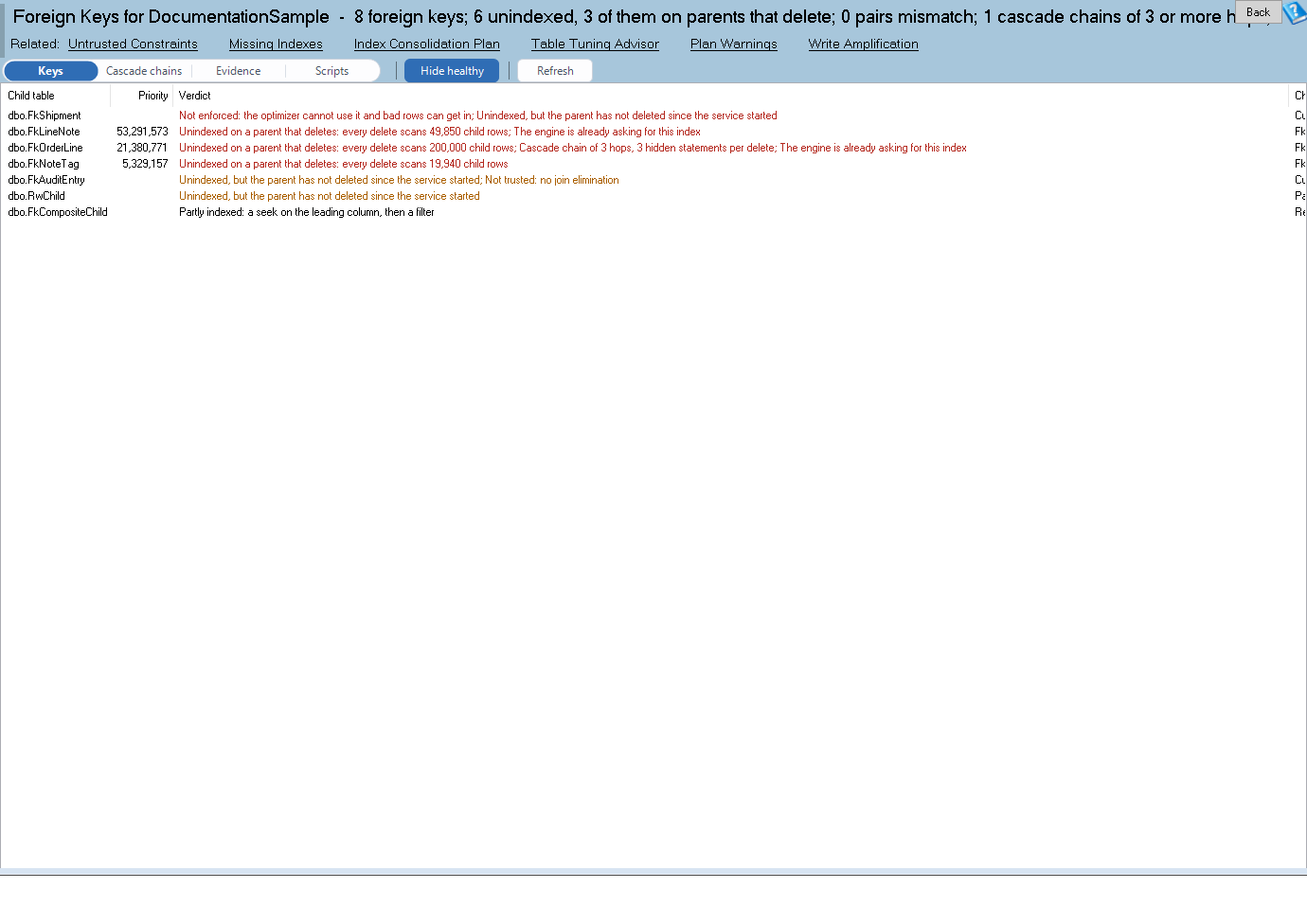
Pick a database in the tree, then choose Real Time > Foreign Keys. Beside the Refresh button is a single line giving the number of keys, how many have no index, the worst one, and a note about the rates. On a narrow window it gets cut off with an ellipsis. Hover to read the rest.
Foreign Keys is one of the reports in Database Health Monitor. It runs against your own servers, and it takes about a minute to have this same screen open on one of them.
Read the rates note. It matters more than it looks. Delete and update counts accumulate from the last service start, and an index rebuild resets them too. A server restarted last night has very little history to offer, and a quarterly purge may not appear in it at all.
Now go to priority. It is child rows multiplied by the daily rate of parent deletes and key updates. A huge child table under a parent that nobody ever deletes from scores very differently from a mid-sized one under a parent that is purged all day long. Sorting by size alone sends people to the archive table first. We have seen that instinct burn a maintenance window on an index that changed nothing anyone could feel.
For the business, this is the difference between a change with a payback and a change that only adds storage and write overhead. Every new index has to be maintained by inserts and deletes from then on. If you want to see what that side of the ledger looks like, read Write Amplification SQL Server Table: What One Row Costs.
Read across the row in this order
The Keys view gives each foreign key one row, and it is a wide one. We take it in stages.

- Covering index. You see an index name, partial, or none. To count as covered, the leading key columns of an index must be exactly the foreign key's columns, though their order does not matter.
- Child rows and parent activity. These are the two ingredients of the priority. Check which one is driving the score.
- Actions and cascade depth. These show whether one delete quietly sets off more work in other tables.
- Trusted, enabled and mismatch. Problems here are separate from indexing, and adding an index will not clear them.
- Requested and evidence. These tell you whether the server itself has left any trace of the cost.
Coverage is where people get caught. An index can mention the right column and still not help. A column that sits only in the INCLUDE list does not count. Neither does a filtered index or a disabled one. Partial means an index starts with one of the key's columns but does not match the rest, so SQL Server can seek and then has to filter what it found. On a composite key, that deserves a second look.
Treat requested as a hint in one direction only. It lights up when a missing index request has exactly the key columns as its equality columns. A blank there does not clear the key.
Telling healthy from needs action
Hide healthy is on by default, so keys with nothing to report stay out of your way. A short grid is good news. Turn the option off when you want the full inventory, for an audit or a handover.
A healthy key has a covering index, is trusted and enabled, and shows no mismatch or deep cascade. A missing index is not automatically a fault either: on a child table under 10,000 rows, the report lists the key as fine. That one rule removes a lot of noise from the conversation.
| What you see | How we treat it |
|---|---|
| No covering index, small child table | Leave it alone for now |
| No covering index, high priority | Review the index script first |
| Partial coverage | Check how much filtering follows the seek |
| Untrusted or disabled | Plan a re-check, since the optimizer cannot use the key |
| Three or more cascade hops | Open the chain before changing or purging anything |
Do not read a blank rate as zero. Without VIEW DATABASE STATE, the delete and update rates are empty and the page tells you so. Get the permission before drawing conclusions. The counts can also run low, because a delete whose ghost record has already been cleaned up is missed.
Mismatch will usually be empty. SQL Server will not create a normal foreign key across columns that differ in type or collation, so the column exists for keys that got there some other way. If one does appear, a type family or collation difference is rated high, since every join between the two has to convert. Precision or scale is medium. A length difference alone is treated as harmless.
Drill down: chains, evidence and scripts
The Cascade chains view draws each chain from the root table to the leaf, with row counts at every step. It also counts the hidden statements a single delete will run. This covers CASCADE, SET NULL and SET DEFAULT. We find it worth showing to application owners, who often believe they are removing one row.
Evidence is where a theory becomes a finding. It searches cached plans for two things: a child table scanned to satisfy the check behind a parent DELETE or UPDATE, and an implicit conversion across a key. Each comes with execution counts and reads per execution, which is the figure to bring to whoever approves the change. It needs VIEW SERVER STATE.
An empty Evidence view proves less than you might hope. Only the busiest 400 statements are examined, and the plan cache is not a history. The month-end purge that hurts may simply not be there today. Look again after it runs.
Scripts is the last stop. You get a CREATE INDEX for each unindexed key whose child has at least 10,000 rows, a re-check statement for each untrusted or disabled key, and an ALTER COLUMN for any mismatch. The page runs none of it. Read each one, compare the proposed index with what the table already has, and put it through your usual change process. The column definitions and rules are in the Foreign Keys documentation.
The cost of leaving this unread tends to surface at a bad time: a purge job that no longer fits its window, or a cleanup somebody postpones again because the last attempt dragged on. If your list is long and you are not sure where the real money is, that is a good point to bring in a second pair of eyes.
What to check on your own server
- Compare each foreign key's columns with the leading key columns of the child table's indexes, ignoring filtered and disabled indexes
- Rank the uncovered keys by child rows multiplied by parent deletes and key updates per day
- Note when the service last started and when indexes were rebuilt before trusting any delete or update rate
- List every untrusted or disabled foreign key and decide who will re-check each one, and when
- Trace any cascade chain of three or more hops from the root table down to the leaf
Try Database Health Monitor Today
Stop guessing which foreign keys are making parent deletes and key updates expensive, and which ones can safely wait. Database Health Monitor shows it on every instance you connect, in the time it takes to open the report.
Download Database Health Monitor and run the Foreign Keys report against your own server. There is nothing to configure first, and you will know inside a few minutes whether it tells you something you did not already know.