
Across the SQL Server environments we review, one pattern turns up so reliably that we have stopped being surprised by it. Somewhere on the instance there is a SQL login that nobody on the current team created, nobody can explain, and nobody dares to touch. It has a name that looks like the product it belongs to. It has permissions that are broader than the product needs. And when we look at its settings, the password policy is turned off.
The shops differ. The industries differ. The versions of SQL Server range from the very old to the very new. The login is the same every time, because it was created the same way every time: by a vendor’s installation script, years ago, that needed a SQL login and turned off the password policy to get past a step that would otherwise have stopped the installer.
This post is about why that matters, what it costs to ignore, and how to deal with it without breaking the application that depends on it. It is also about a new check in the latest release of Database Health Monitor that finds these logins on every instance you connect, and about the other changes in that release that make the evidence easier to share with the people who have to act on it.
What a login with the policy off actually gives up
SQL Server can apply the Windows password policy to a SQL login. The setting is called CHECK_POLICY, and when it is on, three things happen. The password must meet the complexity rules. The password is subject to expiry if CHECK_EXPIRATION is also on. And the account locks out after repeated failed attempts.
Turn the policy off and all three protections go away at once:
- The password can be anything. There is no complexity requirement, so it can be short, guessable, or the name of the product.
- The password never has to change. A credential set in an installer years ago remains valid for as long as the login exists.
- The account never locks out. Someone guessing passwords against it can keep going indefinitely. There is no rate limit, and if failed login auditing is also off, there is no record that it is happening.
That third point is the one we ask clients to think about. A policy off login combined with auditing off is an account that can be attacked forever and silently. The first part is a configuration decision someone made once, in an installer. The second is a default that was never revisited. Together they produce a door that does not log anyone who knocks.
None of this requires a sophisticated attacker. The first guesses any automated tool makes against SQL Server are a blank password and a password that matches the login name. Those are separate findings, and we cover them below. A login with no lockout is simply a login where those guesses, and every guess after them, are free.
Why these logins survive every review
It is worth asking why a problem this common persists, because the reasons are organizational rather than technical.
Nobody owns the login. The person who ran the installer has often moved on. The application team knows the application connects, but not how. The security team sees an account name in an audit extract and has no context for it. A login that belongs to everyone belongs to no one.
Removing it looks dangerous. If the application uses the login and you disable it, the application stops. The cost of that outage is visible and immediate. The cost of leaving it is invisible and deferred. Under those incentives, leaving it alone is the rational choice for each individual person, and the sum of those choices is an exposed instance.
The password is somewhere you have not looked. Vendor logins are usually used by a service, a scheduled task or an application server, and the password lives in a configuration file or a connection string on another machine. Changing it without finding every copy is how a quick security improvement becomes an incident.
Review processes look at people, not at installers. Access reviews ask managers to confirm that their staff still need access. They rarely reach a login that no person uses.
The practical effect is that a policy off vendor login can survive many years and many audits. The fix is not more discipline. It is a report that finds the logins automatically and puts them in front of someone with the authority to decide.
What it costs to find out the hard way
We try to be careful about numbers. We do not quote figures we cannot support, and we do not invent examples. What we can describe is the shape of the cost.
The expensive version of this story is not the login. It is the discovery. A login with no lockout and no auditing means that if someone does get in, the first evidence may be a change in the data or a call from a customer, not an alert. The work after that is investigation under pressure: which logins existed, which could reach which databases, what was touched, and for how long. The less you know about your own logins before that day, the longer that work takes.
The inexpensive version is an hour of work per login, done on a quiet afternoon. Establish whether the login is used, disable it if it is not, and bring the policy back if it is. That is the trade, and it is a good one. An hour now, planned, against an unknown amount later, unplanned.
The new check in Database Health Monitor
The latest release splits one of the Quick Scan security checks in two.
Quick Scan is the report in Database Health Monitor that checks an instance against a long list of known problems and ranks what it finds, with an estimate of how long each takes to fix. It already included a check for SQL logins with weak passwords. That check tested each enabled SQL login with PWDCOMPARE for a blank password and for a password equal to the login name.
The check is now two checks, because they describe two different problems with two different fixes:
- SQL logins with blank passwords keeps its place. It reports logins whose password is blank or equal to the login name.
- SQL logins with the password policy turned off is new. It reports enabled SQL logins that have a password hash, are not internal
##certificate principals, and haveis_policy_checkedequal to 0.
You can see exactly what the new check sees by running the query yourself:
SELECT l.[name],
       l.[is_disabled],
       l.[is_policy_checked],
       l.[is_expiration_checked],
       l.[create_date],
       l.[modify_date]
  FROM sys.sql_logins AS l WITH (NOLOCK)
 WHERE l.[is_disabled] = 0
   AND l.[password_hash] IS NOT NULL
   AND l.[name] NOT LIKE '##%'
   AND l.[is_policy_checked] = 0
 ORDER BY l.[name];
Disabled logins are left out on purpose. A disabled login cannot authenticate, so a missing policy on it is not a way in today. It will be reported the moment someone enables it, which is the behavior you want.
Why we like the split
For our own work, the separation matters for a practical reason: the two findings produce two different conversations with the client.
A blank password finding is urgent and narrow. The conversation is “this account can be entered with no password, we need to change it today, and we need to find the configuration file that holds the old one.” A policy off finding is broader and slower. The conversation is “these accounts have no lockout and no expiry, here is the list, here is which ones are in use, and here is the order we propose to fix them.” Mixing them in one finding forced both conversations into one meeting and obscured which action came first.
How we approach the fix
The mistake we see most often is starting with passwords. Our order is different, and it is the order the help topic for the check recommends.
1. Establish whether the login is used. Look at sys.dm_exec_sessions over several days, and at the successful and failed login records if auditing is on. A single snapshot is not enough, because many vendor logins connect only from a nightly job or a month end process. Many logins turn out to belong to software that was removed years ago.
2. Find out what it can reach. List the server roles each login belongs to, and the databases it can use. A policy off login that is a member of sysadmin goes to the top of the list, whatever else is true about it.
SELECT sp.[name] AS [login_name],
       r.[name]  AS [server_role]
  FROM sys.server_principals AS sp WITH (NOLOCK)
  LEFT JOIN sys.server_role_members AS srm WITH (NOLOCK)
         ON srm.[member_principal_id] = sp.[principal_id]
  LEFT JOIN sys.server_principals AS r WITH (NOLOCK)
         ON r.[principal_id] = srm.[role_principal_id]
 WHERE sp.[type] = 'S'
 ORDER BY sp.[name];
3. Disable the unused ones. Disable rather than drop. A disabled login can be enabled again in seconds if someone turns out to need it, and a dropped one cannot be recovered without knowing its SID and its permissions.
ALTER LOGIN [name] DISABLE;4. Turn the policy on for the ones in use. Be explicit about expiry, because switching the policy on also turns on expiry checking unless you say otherwise, and an expiring password on an application login is an outage on a timer.
ALTER LOGIN [TheLogin] WITH CHECK_POLICY = ON, CHECK_EXPIRATION = OFF;Turning the policy on does not retroactively validate the existing password. When the password is also going to change, change the password and the policy together, and only after you have found every place the old password is stored.
5. Reduce the permissions. A vendor login that holds sysadmin because the installer asked for it deserves a conversation with the vendor, whatever its policy setting is. Many applications run with much less than they are given.
The check estimates about an hour per login for this exercise, most of it spent on step one. That matches our experience. The commands are quick. The investigation is where the time goes.
When the vendor says no
Occasionally a vendor will state that turning the policy on is not supported. We take that seriously and then treat it as a risk to be managed, not a reason to do nothing. The compensating controls are at the network and audit layers: restrict which hosts can reach the instance, make sure failed login auditing is switched on so attempts are at least recorded, and track the login as an accepted exception with a named owner and a review date. An exception that is written down is a very different thing from one that nobody knows about.
Reading the result like a reviewer
A list of logins is only the start. When we sit down with the output of the check, we read it in a particular order, and the columns in the query above are there to support that reading.
Start with create_date and modify_date. A login created long before anyone currently on the team joined is a strong signal that it came from an installer. A modify_date that matches the creation date means nobody has touched the login since, including its password. Neither fact proves anything on its own. Together they tell you which logins to ask about first.
Compare is_policy_checked with is_expiration_checked. The two settings are independent. A login can have the policy on and expiry off, which is a common and defensible choice for an application account. It can also have the policy off, which also turns off the lockout behavior. The new check looks only at the policy setting, because that is the one that removes the lockout. If you see a login with the policy on and expiry off, that is a different conversation, and usually a smaller one.
Look at the name. Logins created by installers often carry the product name, a version number or a suffix such as “svc” or “app”. Names like that are a clue about whom to ask. They are not a reason to assume the login is harmless.
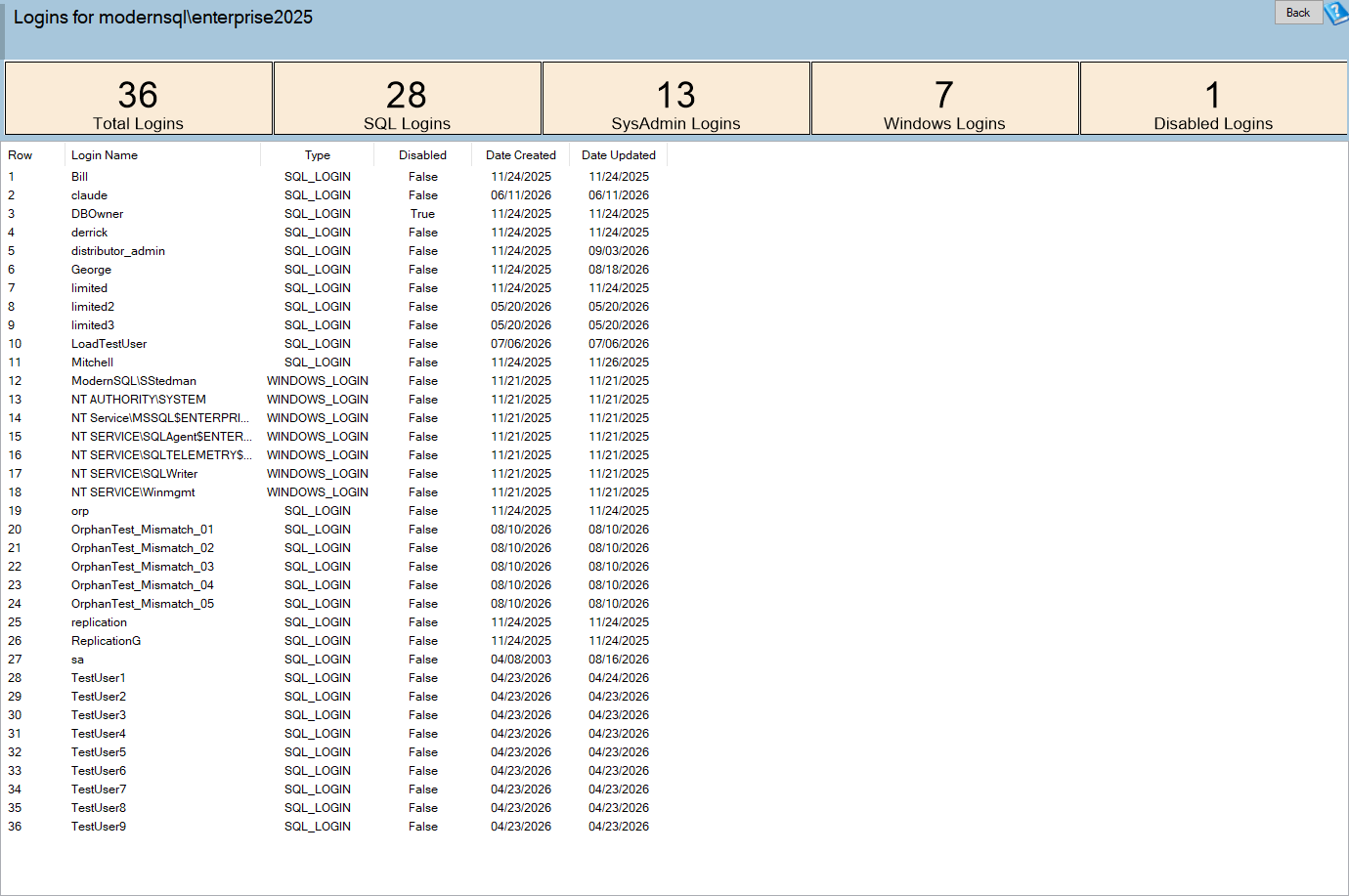
Check for membership in fixed server roles. A login with the policy off and no special server role can still be dangerous if it owns a database or holds broad database level permissions. A login with the policy off that belongs to sysadmin can do anything on the instance. The role query above gives you the first answer quickly. Database level permissions take longer to review, and the Logins and Security Posture reports in Database Health Monitor are where we usually continue.
Confirm activity before concluding anything. A login that has not connected during the days you watched may still be used by a quarterly process. Before disabling anything, we ask the application owner when the last month end or year end run happened, and we disable the login only after we have a rollback plan that takes seconds. This is the reason we prefer DISABLE to DROP.
Write the result down. For each login, record whether it is in use, who owns it, what it can reach, what you did, and when you will look again. The point is not paperwork. The point is that the next person who finds the login has the answer already, instead of starting from the same question you started from.
When the list is long, resist the urge to fix everything at once. Order it by what the login can reach, then by whether it is in use, and take the top few. A short list of finished items is worth more than a long list of started ones.
The rest of the release, from a consultant’s seat
The same release contains several changes that are not about security but that we notice because of how we use the product with clients.
Exports that describe themselves. When you save a grid from Database Health Monitor, the export now asks what the file should contain whenever a selection, a filter or several tables make that unclear. The file can carry an About sheet in Excel, a header block in HTML, or a companion details file for a CSV. It records the report, the server, the time in local time and UTC, the row count, the scope in words and every filter that was active. For anyone who sends findings to a client and then fields a question about them three months later, that record is valuable. A filtered file that does not say it was filtered is a source of arguments.
A recovery page for servers that will not connect. The page that used to say only that the server was not connected now names the server, shows the driver message, explains the likely cause in plain language and offers Try again, Edit connection, Copy error and Help. A successful retry reloads the report you asked for. The server tree also badges servers that were unreachable or refused the login, with a tooltip. The tree learns this from the reports you run, so it adds no load to a server that is already struggling.
A cell level filter. Right click a cell in a grid to copy its value, show only the rows with that value, or hide them. When you are working through a long list of findings with a client on a call, being able to narrow a grid in one click matters more than it sounds.
Theme and accessibility. The Display menu has a Theme submenu with Light, Dark and Follow Windows, and the newer interface now exposes names, roles and states for its custom drawn controls, with a high contrast mode. These help the people on your team who need them and make the product easier to deploy in organizations with accessibility requirements.
527 fixes. More than five hundred tickets were resolved in the release, 29 of them crash reports. Many are Quick Scan checks that now behave correctly on older versions of SQL Server, on availability groups, on case sensitive instances and on databases with Unicode names. Quick Scan now flags SQL Server 2016, whose extended support ended on July 14, 2026. One of the fixes stops the unattended report generator from writing saved connection strings to its log, which is worth mentioning if you run it from a scheduled task and keep the output.
What we would do this week
If you read nothing else in this post, we suggest three actions.
- Run the query above on every instance you are responsible for. It takes seconds and it does not change anything. If it returns rows, you have the start of a list.
- Check whether failed login auditing is on. A policy off login with auditing off is the worst combination, and the audit setting is quick to change.
- Pick one login and walk it through the five steps. Doing one end to end tells you how long the rest will take, and what usually goes wrong in your environment.
If you would rather not do this alone, that is what we are here for. Stedman Solutions works with teams on exactly this kind of review: finding the accounts nobody owns, working out what depends on them, and getting them to a state you can defend to an auditor. The tool finds the logins. The judgment about which ones are safe to disable is the part where an experienced second pair of eyes saves the most time.
Try Database Health Monitor Today
The new Quick Scan check finds every SQL login with the password policy turned off, on every instance you connect. Database Health Monitor shows it on every instance you connect, in the time it takes to open the report.
Download Database Health Monitor and run the Quick Scan report against your own server. There is nothing to configure first, and you will know inside a few minutes whether it tells you something you did not already know.