

The Backup Gap You Don’t Know You Have: How Database Health Monitor Surfaces Recovery Blind Spots
Most SQL Server environments have backup jobs. Most of those backup jobs have been running for years, completing on schedule, logging success in the SQL Server Agent job history, and never triggering an alert. The people responsible for those databases have every reason to believe backups are working. The confidence is entirely justified — right up until a restore is needed and the backup turns out to be incomplete, older than expected, or missing for a subset of databases that were added without anyone updating the backup job.
Backup gaps are not usually the result of failed jobs. They are usually the result of assumptions that were correct at one point and quietly stopped being correct as the environment changed. A backup job configured to protect a specific list of databases does not automatically protect new databases added to the instance. A full backup job running nightly does not protect a database in FULL recovery model from point-in-time data loss if no one is taking log backups. A job that reports success in the Agent history does not guarantee the backup file landed on a disk with enough space, or that the file is accessible from the location where a restore would need to retrieve it.
Database Health Monitor’s backup checks examine the actual backup history recorded in SQL Server system tables across every database on every monitored instance, and surface the gaps that manual review and job success notifications consistently miss.
The Three Categories of Backup Gap
Backup gaps fall into three distinct categories, each with different root causes and different implications for recoverability. The backup checks in Database Health Monitor address all three.
Missing or Stale Full Backups
The most basic backup check confirms that every user database on the instance has a recent full backup recorded in the SQL Server backup history. This sounds like a check that should never find a problem on a well-managed instance. In practice, it consistently surfaces issues in environments of any complexity.
The scenario that produces this gap most often is database proliferation outpacing backup job maintenance. A developer creates a database for a new project and it gets promoted to production. A third-party application installs its own database during setup. A database is restored from another environment for testing and the test becomes permanent. In each case, a database exists on the instance that no one added to the backup job, and the backup job continues to complete successfully — it is successfully backing up all the databases it was configured to back up, which no longer includes all the databases that need protection.
The backup check does not rely on job configuration or job history. It queries msdb.dbo.backupset directly to find the most recent full backup for each database and compares that date against a configurable threshold. A database with no backup record, or with a backup record that is older than the threshold, appears in the report regardless of what the backup job history shows. There is no way for a job configuration gap to hide from a check that goes directly to backup history.
Log Backup Gaps in FULL Recovery Databases
This is the gap that surprises experienced DBAs more often than it should, because the surface indicators all look correct. The full backup job runs nightly and completes successfully. The database is in FULL recovery model, which is the right choice for a production database that needs point-in-time restore capability. Everything looks correct. But if no transaction log backups are being taken, the database in FULL recovery model offers no more recoverability than a database in SIMPLE recovery model — and it carries an additional risk: because the log is never being backed up and truncated through backup, the transaction log will grow without bound until it fills the disk.
A database enters this state most often during initial setup when the DBA configures full backups and defers log backup configuration to “later,” which gets forgotten. It also happens when databases are restored or migrated and the log backup job configuration is not transferred. And it happens when a database’s recovery model is changed from SIMPLE to FULL — perhaps because someone read that FULL recovery is better for production — without also setting up log backups.
The backup check identifies every database in FULL or BULK_LOGGED recovery model that has no recent transaction log backup in its history. This is a precise check: it examines the recovery model from sys.databases and the log backup history from msdb.dbo.backupset, and flags any database where the combination creates a gap between what the recovery model promises and what the backup strategy actually delivers.
Backup Jobs That Completed With Errors
SQL Server Agent job history records success or failure at the job level. A multi-step backup job that encounters an error on one database but continues to the next database may record an overall job outcome that does not clearly communicate that a specific database was skipped or had a backup error. The job ran. The job did not fail outright. But one database in the list did not get successfully backed up.
This is particularly common with third-party backup tools and custom backup scripts that are designed to continue through individual database errors rather than failing the entire job. The design choice is sensible — an error on one database should not prevent backups of other databases from completing — but the consequence is that backup errors on individual databases can be overlooked in job history review unless someone is drilling into the step-level detail for every job run.
Database Health Monitor’s backup checks detect this by looking at backup history at the database level rather than the job level. If a database did not get a successful backup in the expected window, the check flags it regardless of whether the job that was supposed to back it up reported success. The job history is not the source of truth; the backup history is.
What the Report Shows
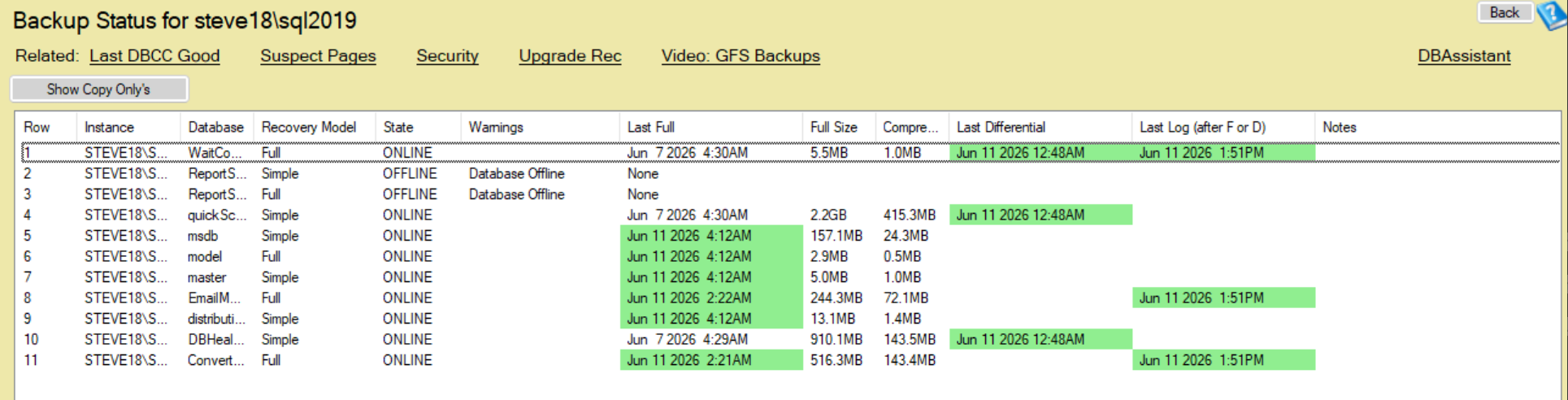
The backup findings in Database Health Monitor are presented as part of the Quick Scan Report, with each database’s backup status visible alongside the other health indicators for the instance. The report presents:
- Each user database with its most recent full backup date and age
- Databases in FULL or BULK_LOGGED recovery model with the date of their most recent transaction log backup, and a flag where log backups are absent or overdue
- Databases where the backup age exceeds the configured threshold, sorted to put the most overdue at the top
- The overall backup health status for the instance, giving an at-a-glance indication of whether the backup posture is acceptable or has gaps requiring attention
The output is at the database level, not the job level. Every database on the instance appears in the report, which means databases that are not covered by any backup job appear explicitly as unprotected rather than being invisible because they are not in any job’s configuration.
Why This Matters More Than Backup Job Monitoring
Monitoring backup jobs — watching for job failures, alerting on non-zero exit codes — is a reasonable practice and catches a subset of backup problems. It does not catch the gaps described above, because those gaps are not job failures. They are coverage gaps, recovery model mismatches, and silent per-database errors that exist underneath a layer of job-level success indicators.
The distinction matters because the confidence that comes from seeing successful backup jobs every day is not equivalent to the confidence that comes from verifying that every database has a usable backup. The former monitors a process. The latter verifies an outcome. What matters at restore time is outcome, not process.
A DBA who monitors job success is watching for the backup process to break. A DBA who reviews Database Health Monitor’s backup checks is watching for the backup outcome to be insufficient. The second check catches everything the first check catches, and a large category of problems that the first check will never surface.
Integrating Backup Checks Into a Regular Review Process
The value of backup checks is highest when they run frequently enough to surface gaps before they become long-standing. A backup gap discovered the same day it develops can be investigated and remediated the same day. A backup gap discovered during a restore attempt may represent days or weeks of unprotected transaction history.
Automated execution via the command-line interface allows backup checks to run on a daily or more frequent schedule, with results delivered by email so that gaps surface in a morning review rather than during an incident. Combined with the email alerting feature, specific findings — such as any database with no backup in the last 48 hours — can trigger direct alerts rather than requiring a human to review the full report every day to catch a newly developed gap.
The combination of scheduled automated execution and threshold-based alerting creates a backup monitoring posture that is both comprehensive (covering every database, not just the ones in the backup job configuration) and low-maintenance (surfacing findings automatically rather than requiring daily manual review to detect problems).
Backup Gap Detection in July
Backup verification is one of more than 100 checks included in the Quick Scan Report in Database Health Monitor by Stedman Solutions. Through the end of July, annual plans are available at 25 percent off as part of the Database Health Monitor July promotion.
If your current backup confidence is based on job success notifications rather than verified backup history across every database, the backup checks in Database Health Monitor will show you a more complete picture — and very likely surface at least one gap you did not know was there.
Check out this offer:Explore our Database Health Monitor special pricing.

Here are all the discounts for Database Health Monitor. Pick the one that fits your server count.
25% off 1 Instance – Code: 25OFF1
25% off 10 Instances – Code: JULY25
25% off 20 Instances – Code: 25OFF20 – Best Value
Free SQL Server Replication Course
Start Database Health Monitor Month with one of our most valuable training offers. Purchase a new one-year subscription to Database Health Monitor between July 1st and July 7th and receive our SQL Server Replication Course absolutely free. This comprehensive course covers snapshot, transactional, and merge replication, helping you better understand, manage, and troubleshoot replication environments. Whether you are maintaining existing replication or planning a new deployment, this course provides practical, real-world knowledge that can save hours of frustration. A $499.99 value included at no additional cost.