
SQL Server Database Health & Performance Assessment
Find out exactly what is slowing your SQL Server down, then get it fixed: a monitoring baseline, a prioritised findings presentation and hands-on remediation in about three weeks.
US-based SQL Server specialists since 2015. No cost, no obligation.
Is an assessment right for you?
Our Database Health and Performance Assessment evaluates the health and performance of your SQL Server, finds the major and minor weak points, including backups and maintenance, and then we fix what we find, so your databases run safely, perform well and can scale for future growth.
Need something lighter than a full assessment? Our SQL Server performance consulting page explains the other ways we can help, from a rapid tuning engagement to ongoing managed services.
- Queries or reports have slowed down and nobody knows why.
- Users see timeouts, or the application feels sluggish at peak times.
- You have had an unexplained outage, crash or recurring downtime.
- The database keeps growing and you are not sure the server will scale.
- SQL Server licensing or hardware costs feel too high.
- Backups and maintenance jobs have never been verified, or you have no dedicated DBA.
- You need security and compliance questions answered with confidence.
- You want the problems fixed, not just a report.
If two or more of these sound familiar, the free 30-minute consultation is the fastest way to find out what is going on.
What the assessment uncovers, and what it fixes
Security vulnerabilities
Inadequate user access controls and other security weaknesses that leave the database open to attack, found and closed.
Performance bottlenecks
Inefficient queries, indexing gaps, design issues and configuration problems that make the whole database feel slow.
Scalability and future planning
How well the database will handle growth, and what to change now so the infrastructure is ready for future needs.
Slow response times
Poorly performing databases frustrate users and drain productivity. We find the causes and remove them.
Downtime
Performance problems that escalate into crashes or outages. We catch them before they take the system down.
Licensing and hardware cost
Inefficient databases need more resources to run. Clients have been able to downsize their SQL Server licensing costs after one of our assessments.
Every assessment includes a performance review, a storage and capacity review, a security audit, a backup and recovery evaluation, corruption checks and a configuration review.
How it works: about three weeks from kick-off to findings
1
Day 1
Kick-off call
A Teams or Zoom call within four days of signing, to agree scope, access and the schedule.
2
Days 1 to 7
Monitoring baseline
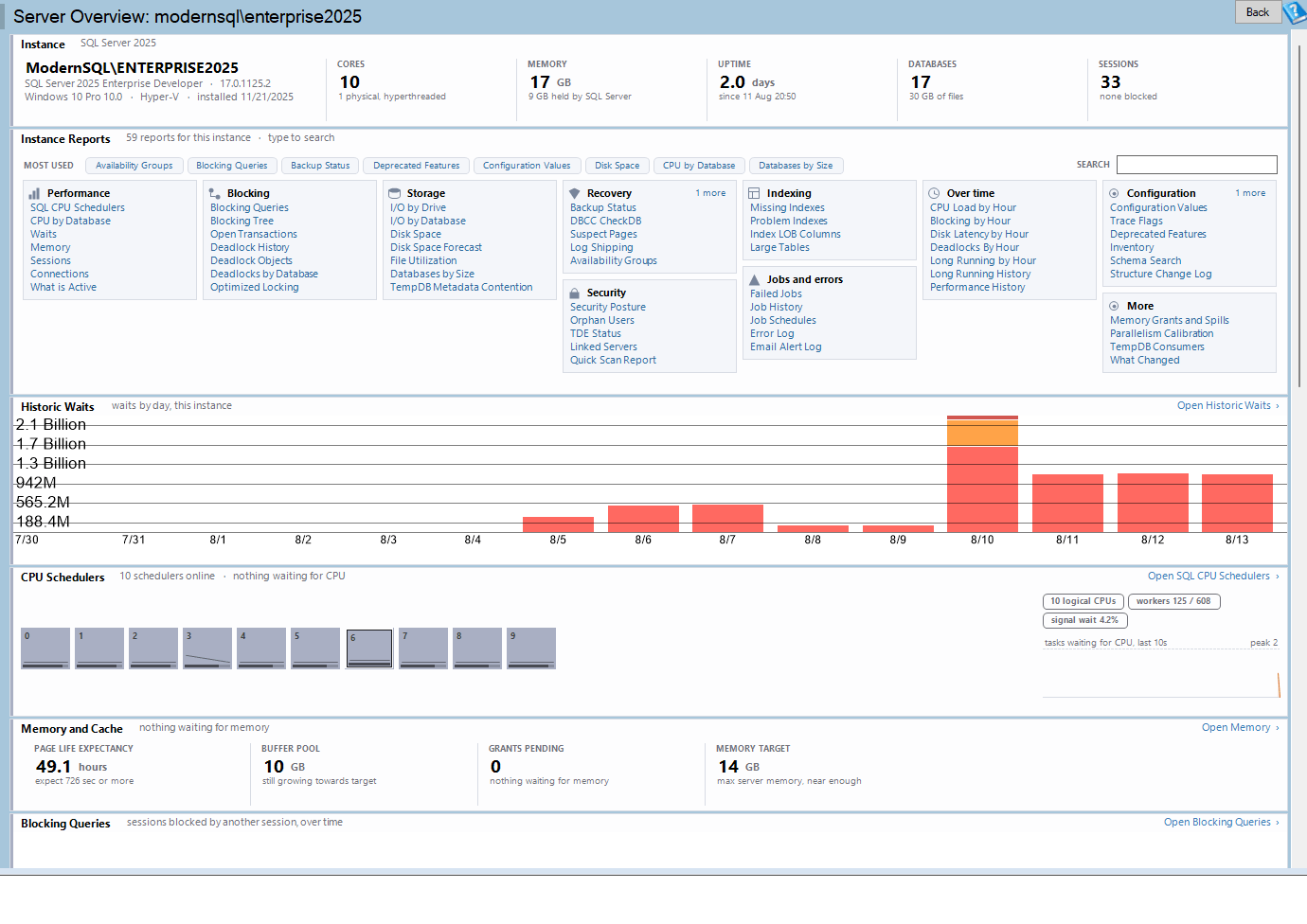
We install the Database Health Monitor database and monitoring script. It adds roughly 3% load and collects 5 to 7 days of real workload data.
3
Days 8 to 18
Evaluation and remediation
We review the data, build a prioritised findings presentation with time estimates, and make the in-scope changes for you. Larger or longer-term items are estimated so you can plan them.
4
Days 18 to 21
Final presentation
A walk-through, over Teams or Zoom and recorded on request, of what is causing the performance, scalability and stability issues on your SQL Server, with options and next steps.
What you get
- A monitoring baseline from Database Health Monitor, collected on your server over 5 to 7 days.
- A written and presented findings report covering performance, scalability and stability.
- A prioritised list of fixes, with time estimates for anything outside the assessment scope.
- In-scope changes made for you during the engagement, not left as homework.
- A recorded final presentation on request, so your team can replay it.
- A follow-up to confirm the changes had the intended effect.
What we need from you
- A SQL Server login that can install the small monitoring database and read server state. We confirm the exact permissions on the kick-off call.
- A point of contact for the kick-off call and the findings presentation.
- Agreement to roughly 3% monitoring overhead while the baseline is collected.
That is all. We handle the installation, the analysis and the changes, and we keep you informed at every step.
What clients say
- US-based
- SQL Server specialists since 2015
- Hands-on remediation, not just a report
We are moving our SaaS offering from one cloud provider to another and took the opportunity to evaluate our database performance and security ahead of the move. Steve and team worked with us to do an assessment of current state and suggest changes that would both make the move easier as well as improve the performance of our overall application. The team is very knowledgeable and easy to work with. What I liked most is that unlike a typical consultant, they did not just make recommendations, present them and leave; they worked with us to implement the recommendations in our test and production environments and followed up to make sure they had the desired effects. We will be working with Steve’s team in the future to ensure our database is always in tip top shape.
Scott Effler, Director of Software Engineering, Multivista

Thanks to Steve Stedman from Stedman Solutions for their recent collaboration on a database optimization project. I commend Stedman for his effective communication, seamless teamwork, and valuable insights that were easily implemented to enhance our application’s performance and speed. I highly recommend Stedman Solutions for any kind of SQL optimization and DBA work and assure that he is the right person for such projects.
Patrick Clark, CEO, Meridios

Frequently asked questions
How long does an assessment take?
About three weeks. Database Health Monitor collects 5 to 7 days of data first, then we evaluate the results and make the in-scope changes, and the final presentation is usually scheduled 18 to 21 days after the kick-off call.
Will the monitoring slow down my server?
Not noticeably. Database Health Monitor adds roughly 3% load to the SQL Server while it collects the baseline, and the monitoring database it uses is small.
What access do you need?
A SQL Server login that can install the small monitoring database and read server state, plus a point of contact for the kick-off and findings calls. We confirm the exact permissions and the remote access method on the kick-off call, which is held over Teams, Zoom or an equivalent.
Do you fix the problems or just report them?
Both. Changes that fit inside the assessment scope are made for you during the evaluation and remediation step. Larger or longer-term items are included in the findings presentation with time estimates, so you can decide what to do next. Clients tell us this is what sets us apart from a typical consultant.
Does this work for cloud-hosted and on-premises SQL Server?
Yes. We work with SQL Server on-premises and in the cloud, including Microsoft Azure and Amazon AWS, and we also help with migrations between them.
What does it cost?
Pricing depends on the number of SQL Server instances and the size of the environment. The free 30-minute consultation is where we scope the work and give you a quote, with no obligation.
Related services
SQL Server Health Check Report
A focused health check of one SQL Server instance with a written report. A lighter option when you want a quick second opinion. Learn more
Rapid SQL Server Performance Tuning
When you already know what hurts and need it fixed fast, without a full assessment first. Learn more
Managed Services
Ongoing DBA coverage after the assessment: monitoring, maintenance and an expert on call when something goes wrong. Learn more
The monitoring baseline is collected with Database Health Monitor, our own SQL Server monitoring tool (see screenshots).
Further reading
Ready to find out what is slowing your SQL Server down?
Book a free 30-minute consultation and we will tell you whether an assessment is the right next step, with no obligation.
Prefer email? [email protected]